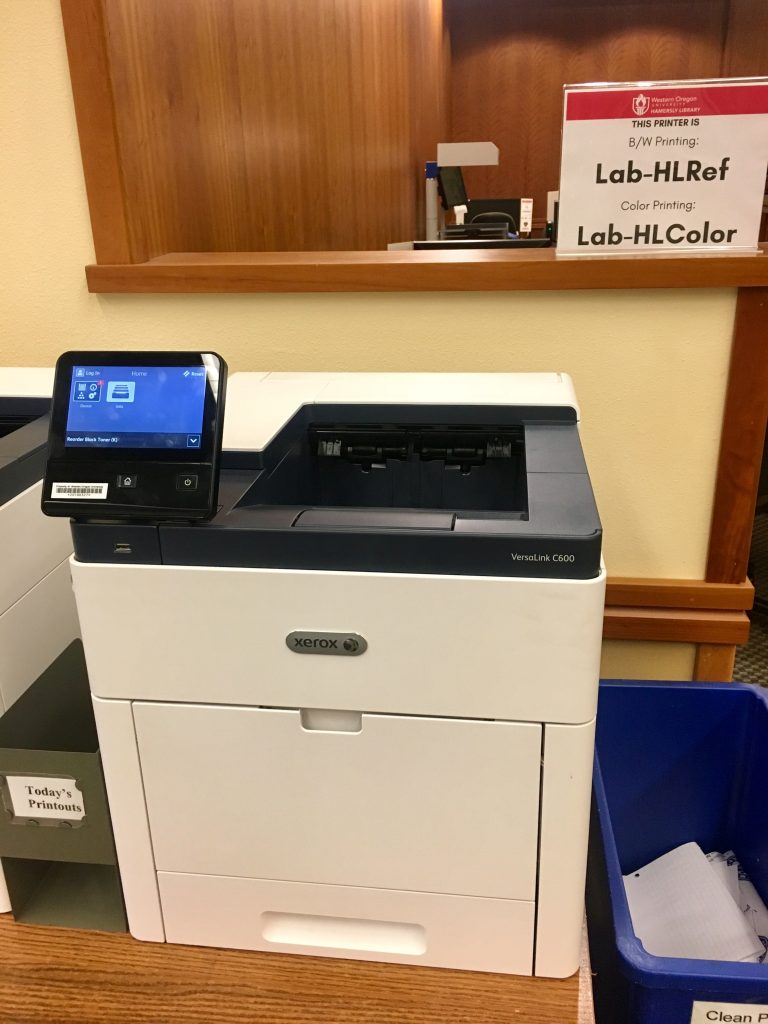
Night owls and early birds alike have a study option at Hamersly, even when the library is closed. Our student lounge (located on the west side of the library building) is open 24 hours a day and features 6 PCs, a printer, study space, and vending machines.
Author Archives: gabaldoc
PURE Insights: Explore undergraduate research at WOU
PURE Insights is WOU’s peer-reviewed Undergraduate Research Journal and includes works by WOU undergraduate students working closely with a WOU faculty mentor. Since the publication of the inaugural issue at the end of May, content from PURE Insights has been downloaded more than 1660 times by visitors from 43 different countries.
The next issue will be published in May 2013, with a submission deadline of December 31, 2012.
EasyBib
Connect EasyBib to Google Apps @ WOU for further functionality: Sign in via the Google button, and enter your WOU email address
Fall Exhibit: Green Light

WOU is proud to host “Green Light,” an art exhibition by 15 emerging artists with disabilities presented by VSA arts and Volkswagen Group of America, Inc.
1st floor lobby, 2nd floor gallery, & 3rd floor galleries
September – December 2010
Accessing the Terminal Servers
PC Users:
Go to Start > Programs > Accessories > Remote Desktop Connection.
If you are using Windows XP, you may need to go into Communications within Accessories to locate the program. Once the program has started, use the steps for everyone (below) to connect to WOU’s terminal servers.
Mac users:
You may need to download the free Remote Desktop Connection software from Mactopia
(the download link is at the bottom of that page). Once it is installed, locate Remote Desktop Connection in the
Applications Folder and double click on it. Once the program has started, use the steps for everyone (below) to connect to WOU’s terminal servers.
Everyone:
- In the Remote Desktop Connection window, in the “Computer:” field, type:
ts.wou.edu - Click Connect. You may get a message asking if you trust
the connection. That is normal, go ahead and click on Connect. - In the Log On to Windows box, type in your paw print user name and
password and change the domain to MASH. Then click
OK. - When you are done, end your session by clicking on Start then Shut Down
in your Remote Desktop Connection window. - In the Shut Down Windows dialog box, select Log Off, and then click OK.
Need to access your USB drive or printer while using Remote Desktop? Use these instructions.
Google Scholar
Google Scholar is a scholarly search tool from Google, separate from its main search engine.Its purpose is “to search specifically for scholarly literature, including peer-reviewed papers, theses, books, preprints, abstracts and technical reports from all broad areas of research.” The full text of many items is available online (either freely or by using the “Find it @ WOU” link), although in some instances abstracts with links to pay-per-view document delivery services are displayed.
Have some free time?
Save paper by printing double-sided
To do this on most campus printers:1. Select File –> Print from your document
2. Choose the printer (e.g., \\krusty\Lab-HLRef)
3. Click the Properties button.
4. On the Paper/Output tab, find in the 2-Sided Printing dropdown menu and select “2-sided print.”
5. Click the OK buttons for the two windows.
Want to be even more efficient? Print 2, 4, or more pages per side on each sheet of paper!
Under Properties, go to the Layout/Watermark tab. Select the number of pages to appear on each side, and select Portrait or Landscape orientation.
Following these simple steps saves a massive amount of resources!
See what WOU faculty are publishing
WOU faculty are constantly publishing articles, books, and chapters in books. The library is now offering two ways of locating some of these (shown below): a feed of items appearing in the Ebscohost Databases and a feed of items appearing in Google Scholar. While there is some overlap between the contents of both feeds, each contains unique items.
You can subscribe to them using a reader (such as iGoogle) or visit this page regularly to see what is new.
The feeds are not a comprehensive list of publications and may also include a limited number of scholarly publications that mention WOU or WOU faculty but are not actually written by WOU faculty. In particular, publications by faculty in the humanities may be underrepresented.
Recent publications by WOU faculty in Ebscohost Databases
$XMLFILE = "http://rss.ebscohost.com/AlertSyndicationService/Syndication.asmx/GetFeed?guid=2007555";
$TEMPLATE = "http://www.wou.edu/provost/library/website/scripts/rss/faculty-template.html";
$MAXITEMS = "5";
include($_SERVER['DOCUMENT_ROOT']."/provost/library/website/scripts/rss/rss2html.php");
?>
See More…
Recent Publications by WOU faculty in Google Scholar
$XMLFILE = "http://pipes.yahoo.com/pipes/pipe.run?_id=bd7476ff71ca708558d3996a2f7b8a66&_render=rss&q=%22western+oregon+university%22+-%22teaching+research+institute%22&year=2009";
#http://pipes.yahoo.com/pipes/pipe.run?_id=12afd88008be7f0743d985804063fa41&_render=rss&q=%22western+oregon+University%22+-%22teaching+research+institute%22&year=2009
$TEMPLATE = "http://www.wou.edu/provost/library/rss/faculty-template.html";
$MAXITEMS = "5";
include($_SERVER['DOCUMENT_ROOT']."/provost/library/website/scripts/rss/rss2html.php");
include($_SERVER['DOCUMENT_ROOT']."/provost/library/website/scripts/scrape/simplehtmldom/example/scraping/example_scraping_gs.php");
?>
See more results from Google Scholar
Google goes scholarly
Its purpose is “to search specifically for scholarly literature, including peer-reviewed papers, theses, books, preprints, abstracts and technical reports from all broad areas of research.” The full text of many items is available online (either freely or by using the “Find it @ WOU” link), although in some instances abstracts with links to pay-per-view document delivery services are displayed.
Google Scholar searches a specific subset of Google’s index and covers a wide range of academic content areas. The coverage is strongest in science and technology and weakest in the humanities.
One particuluarly useful aspect of Google Scholar is the ability to easily find articles that have cited the one you are looking at. Look for the “Cited by” link to take advantage of this feature.
If you are off campus, you may want to use the access to Google Scholar provided by WOU’s Articles and Databases page. This way, the “Find it @ WOU” links will show up and the content that WOU pays for on your behalf will be available to you.
Please keep in mind that since Google Scholar is a beta product, things keep changing. The content, coverage and functionality may be different from when you last used it.